Friday, November 25, 2011

dirtyFields jQuery Plugin Updated To Fix jQuery 1.6 Compatibility Issue

A few days ago, I received an e-mail informing me that there was a bug in my dirtyFields jQuery plugin having to do with the plugin's evaluation of checkbox and radio button state (the plugin lets you track the state of form elements and highlight changes).

At first, I didn't see the problem and didn't understand the need for the code suggestion he provided because the demo file included in the plugin download worked just fine.  But then I realized that the demo was coded to use an older version of jQuery (the plugin is over 2 years old now), and once I updated the demo to use jQuery 1.7 I could see the problem.

I had coded the plugin to use the jQuery attr() function to check the selection state of checkboxes, radio buttons, and the option elements in <select> elements.  Prior to jQuery 1.6, code like myCheckbox.attr("checked") would return a Boolean value based on whether the checkbox was currently checked or not.  But that changed in jQuery 1.6: now (in 1.6 and higher), myCheckbox.attr("checked") only returns the initial value of the "checked" attribute of the element ("checked" rather than "true"), and returns undefined if the checkbox/radio button element does not possess the checked attribute at all.  The same hold true for the "selected" attribute of option elements.  In jQuery 1.6 and higher, the new prop() function is designed to return the current state of the selected attribute (this change to jQuery is in fact described on the API page for prop()).

So I updated the plugin to use the is() function in conjunction with the ":checked" and ":selected" selectors to evaluate checkbox, radio button, and option state, since that method works with both older and newer versions of jQuery.  The new version of the plugin is available via the GitHub link from its dedicated GitHub Pages site.

Monday, October 3, 2011

Two Thoughts On Today's Adobe MAX (2011) Day One Keynote

I'm not going to try and summarize the keynote:  you can either watch the replay at http://www.max.adobe.com/online/ or read a brief synopsis at http://max.adobe.com/news/2011/keynote_day1.html.

My first thought is actually about some news that wasn't part of the keynote, but was announced on the Internet during the keynote:  Adobe's acquisition of PhoneGapPhoneGap is an application framework that allows developers to build mobile apps using web technologies (HTML, CSS, and Javascript) and the PhoneGap API (to access particular device functions like geolocation, the camera, internal storage, etc) and then package and deploy those apps such that they work on most mobile operating systems (Android, IOS, Blackberry, and a few others).

What struck me about that news was that it means Adobe now provides two ways for app developers to develop cross-platform apps.  If a developer is already familiar with Flash and Flex development, they can build mobile apps using Flash Builder and Adobe AIR.  If the developer is more skilled with web design and programming, they can build apps using PhoneGap.  In both cases, the end result is an app that runs natively on your device of choice (IOS, Android, whatever).

First of all, it's yet another example of Adobe's willingness to support both Flash and HTML5 as development platforms going forward.  A number of tech analysts contend that Adobe's development of new tools that play nice with HTML5 is a capitulation of some kind to the way the industry is moving.  I don't see it that way: Adobe may be synonymous with Flash, but it's never been all about Flash with them.  They have always supplied the tools that the digital and web creation markets have demanded, just as any sane company would, regardless of what their internal preferences might be.

The other thing about the PhoneGap acquisition is that it will expand the number of developers using Adobe tools and technologies to create mobile apps for both Android and IOS.  And now suddenly Adobe potentially a big player in the smartphone and tablet space, not by release their own mobile OS or mobile hardware, but by providing the tools to any developer who wants to write on any and all of these platforms.  To be clear, at the moment there are certain kinds of apps or app functions that a developer would want or need to develop in native OS code, but as the Adobe tools provide ways to overcome those limitations (such as the ability to include native code extensions in Flash/AIR apps), the number of reasons for writing an app in native OS code (and hence writing a second version for deployment on another platform) are going to become fewer and fewer.

My second observation regarding the keynote concerns the suite of touch-optimized mobile apps - the Adobe Touch Apps - coming in November to Android devices and later to IOS devices.  While some of the apps are geared more towards visual designers, the Proto wireframing app is something I could use in the design phase of my web and mobile application work, and, well, who wouldn't want a touch-optimized version of Photoshop to use to mess around with their photos?

And that's when the thought occurred to me:  here were some apps that I could use to be productive with a tablet.  I'm an application developer who writes code.  I have access to two tablets and I don't use either of them to write code or generate digital content of any kind.  For me, tablets have always been digital consumption devices (something Amazon seems to recognize with their new Kindle Fire tablet) for viewing video, looking at pictures, or reading web pages or books, and kinda superfluous given I can do all that and much more with a laptop (to be clear, I do love my Nook Color as an e-reader, but I rarely use it to surf the web or anything else).

But the apps Adobe showed off today made me feel like I would in fact want to use them on a tablet, because they were designed specifically with tablets and touch-interaction in mind, not as desktop apps shrunk into a mobile form factor.  That to me is a step in the right direction, and it's apps like those that are going to grow the tablet market by making the tablet experience more compelling.

Monday, June 20, 2011

An Overview of buzztouch, A Mobile App CMS for Non-Programmers

The other day I stumbled on a Make Use Of article about buzztouch, a "iPhone, iPad, Android app builder and content management system."  Since we're researching options for creating cross-platform mobile applications, and the article indictated that it was worth checking out, I decided to sign up and give buzztouch a spin.

buzztouch is designed to let non-programmers build a mobile app on the buzztouch website using a collection of web-based forms.  The app-building interface prompts you to create certain items, like a launcher icon for the app, a banner image for the home screen, and an "info" page for the app, but you choose what other content you wish to provide from a drop-down list of different components.  One component lets you create a screen of formatted text using CKEditor, while another lets you create an app screen using HTML, CSS, and Javascript.  There are components for pulling in remote content such as web pages, YouTube pages, streaming audio and video files, and RSS feeds.  One component lets you pinpoint one or more locations on a Google Map with brief location information that a user of the app can then use to get driving directions to those locations from their current position.  Even though I was casually playing with the system, I was able to create an app using several of these components in under two hours.

Once you've created the app, you can then download the native source code for the app:  you're provided with separated source code downloads for IOS and for Android.  The source code comes in a .zip file, which also contains a readme file with instructions on how to compile the source code for that particular platform and create the native app.  It only took me a few minutes to create an Android app from the source code, and it only took me that long because I had to provide a Google Maps API key to enable the mapping component I'd added (the readme provided exact instructions on the changes I need to make it the code to use the key).  I had my IOS developer colleague compile the IOS version of the app, and it was also smooth sailing for him.  The resulting app on the Android platform looked a little rough simply because of the generic design elements, but the IOS version looked pitch-perfect.

The first time you access any component or screen in the mobile app, there is a pause as the app retrieves the content or content instructions from buzztouch then caches it for local use.  This is where the content management system aspect of buzztouch kicks in:  any changes you make to the app on the buzztouch site get pushed to (or pulled by, not sure which) the mobile app.  So the app owner doesn't need to recompile and update the app through the App Store or the Android Market in order to make content changes.  If the mobile device doesn't have a network connection, then the cached content is used.

So what's my overall take on buzztouch?  I think that if you need to build a mostly informational mobile app, something that serves the same purpose as a mobile-optimized website, then buzztouch is a compelling option because of how easy it is to create the app and then update the content.  Even if your long-term strategy is to redesign an existing "desktop"-optimized website to be mobile-friendly as well, a buzztouch app could fill the void until that goal was reached.

If you need to build a mobile app that's more interactive, one where the user can send and receive custom data, then buzztouch is at best an incomplete solution.  There are no buzztouch components for collecting data (though the app itself will capture GPS info from the device in order to map where the app has been used, which is both useful and slightly disturbing), but you could probably use the Custom HTML component to create a web form that transmitted data via a regular form submit or via AJAX.  And there are as yet no components that let you access device-specific functions like the camera or accelerometer.

On the other hand, if you are capable of doing some IOS or Android coding, the native code provided by buzztouch could serve as a starting point for adding additional functionality:  the buzztouch folks seem to be open to folks using the generated code to advance their learning of native app programming.

So overall, I'm impressed with what buzztouch has done so far with the direction they've taken, and I hope they continue to improve on the platform.

Friday, June 10, 2011

For CFSelenium Users: An Ant Script to Transcribe Your Tests For Multiple Browsers

The easiest way to create a CFSelenium test case is to use the Selenium IDE plugin for Firefox to compose the test, then export the test using the export formatter Bob Silverberg included in the CFSelenium project.  You end up with a test that can be run against Firefox but can be further customized to your needs.

Of course the beauty of CFSelenium is that it lets you run those tests against browsers other than Firefox, to conduct cross-browser testing.  But who wants to create multiple copies of the original tests, or edit the test files whenever you want to check them against another browser?

Not this guy.

So I went ahead and created an Ant script that will take the CFSelenium tests generated for Firefox and transcribe them to work for other browsers I wanted to test against.  The script includes configuration properties that allow you to customize the browser settings to your environment.  For example, I needed the script to be able to rewrite my Internet Explorer tests to run IE on a virtual machine rather than on localhost.  I also took what I learned about capturing screenshots using CFSelenium and added a nice screenshot management feature to the script:  if you add one or more captureScreenshot or captureEntirePageScreenshot statements to your tests, the script will make sure you're using the correct statement for the particular browser, will rewrite the statement to place the screenshot files in a particular directory, and will add code that will incrementally name the screenshot images so you can take and preserve multiple screenshots for one or more tests.

I've put this Ant script up on GitHub at https://github.com/bcswartz/CFSelenium-Cross-Browser-Converter-Ant-Script.  The Ant file itself provides a lot of guidance on how to configure and use the script and some hints on using CFSelenium in general.  Hopefully it's usable even by folks who aren't completely comfortable with Ant.  I myself am still something of an Ant noob:  I'm sure there are more elegant ways of writing this script, and Ant gurus are welcome to fork the GitHub repo and make improvements.

Tuesday, May 24, 2011

CFSelenium News: No Need To Start Selenium Server Separately Anymore

In my earlier blog post on how to install and run CFSelenium, my steps included directions on copying the .jar file for the Selenium-RC/Selenium Server application to an easily accessible location and then starting your CFSelenium testing session by executing that .jar file from the command line.

I'm happy to report that anyone using CFSelenium in conjunction with ColdFusion 8 or 9 can skip those particular steps.  Marc Esher (of MXUnit fame) recently contributed code to the CFSelenium project that enables CFSelenium to start the Selenium Server (if it's not already running) anytime you run a test, and stops the server once the test is complete.  This code is now part of the latest version of CFSelenium that can be download via the CFSelenium GitHub page.

Unfortunately, when I revised the tag-based, CF 7/8-friendly versions of the CFSelenium files to incorporate Marc's code and ran it against CF 7, I found that CF 7 apparently could not start and stop the Selenium Server via the new code.  So ColdFusion 7 users will still have to start Selenium Server from the command line, but otherwise CFSelenium still works in CF 7.

Monday, May 23, 2011

Integrating Mura with the Jasig Central Authentication Services (CAS)

I've already posted most of this information on the Mura forums, but I wanted to post it here as well for anyone looking for information on this topic.

With the blessings of my boss, I've been playing around with the ColdFusion-powered Mura content management system to see if it might be a good CMS option for us.  From what I've seen so far, Mura is a well-thought out CMS system that is both powerful and easy to use, which is a difficult balancing act.

One of the things my boss wanted me to investigate was whether or not we could tie Mura in with our single sign-on solution, which is CAS (Central Authentication Service), a Jasig project originally created at Yale.  When a user tries to access a page or a site that requires them to authenticate, they are redirected to the CAS server and enters their LDAP-based user id and password on the CAS login page.  If they successfully authenticate, the CAS server redirects them back to the original site and stores a token as a cookie in the user's browser.  If the user visits a different website secured by CAS, the cookie allows them access to that site without the need to log in again.

Mura provides a plugin architecture that allows developers to intercept certain Mura events and run their own code.  A number of Mura shops have created plugins that intercept the Mura login events in order to tie in with their in-house directory and authentication servers, but those login events are triggered by the admin and user login forms built into Mura.  I couldn't go that route:  I needed to circumvent and replace the Mura login form(s) with the CAS login form and have Mura log in the user based on the credential information returned by CAS.

After some digging into the code and some trial-and-error, I came up with a way to authenticate Mura administrators via our CAS system.  First, I created admin user accounts in Mura where the username matched the username/user identifier returned by a successful CAS login.  Then I created a Mura plugin that would fire with the OnGlobalRequestStart event with the following event handler:


...The code in this plugin will only execute if the user navigates to /admin/index.cfm (without any URL query parameters) and the "mura" struct in the session scope contains an empty userId key.  Without these conditionals, the login code will run at times when you don't want it to, like when the user is trying to log out or when saving page edits (apparently saving content changes involves navigating to the admin/index.cfm page without URL query parameters).

The NetId is the user identifier returned by CAS.  If it's not found in the session scope, the action is redirected to adminCASLogin.cfm, a variation on the CAS authentication script posted on the CAS website (https://wiki.jasig.org/display/CASC/ColdFusion+client+script).  The user enters their username and password on our CAS login form page, and if the log in is successful the adminCASLogin.cfm page copies the NetId to the session scope and uses cflocation to go to admin/index.cfm.

Now that the NetID exists in session, the plugin queries the tUsers table (the Mura database table containing, well, user records) for an admin account with a username that matches the NetId and gets back the Mura userId for that person, and provides that userId along with other values to the loginManager's loginByUserID() function.  The admin user ends up in the administrative Dashboard, logged in and ready to go.

The one drawback to this method is that when a user logs out, they are presented with the normal Mura admin login form, which can be a little confusing.  But without knowing the password to their Mura user record, they would still have to log in via CAS.

I wrote a similar plugin for requiring CAS authentication to access a particular Mura site (an "internal" site only viable to authorized personnel).  In this case, the event handler executes in response to the OnSiteRequestStart event:


...in this case, I had to create my own session variable (session.userId) for denoting if the user had already authenticated via CAS.  The siteCASlogin.cfm file is pretty much the same as the adminCASLogin.cfm file in the first example except that when it completes the CAS authentication it uses cflocation to return to the index.cfm page of the site (rather than admin/index.cfm).

If the user successfully authenticates via CAS and has any sort of Mura user account, they will be granted access to the site, and if they are a Mura admin they will be logged in so they can edit the site if they wish.

Sunday, April 3, 2011

Quick Tip: Controlling Execution Speed in CFSelenium

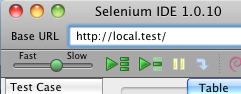
When you use Selenium IDE to play back the actions you've recorded on a web page (the clicks, the text input, etc.), you can control the waiting period between the execution of each command using the slider control on the left end of the tool bar:

With CFSelenium, the way that you control the time period between executions is with the setSpeed(string milliseconds) function.  Once you set the execution speed with this function, the time period between executions will remain set at that length until you use setSpeed again.  So you could set the speed once within the setUp() function of your MXUnit test case...

public void function setUp() {
    browserUrl = "http://local.test";
    selenium = new CFSelenium.selenium(browserUrl, "localhost", 4444, "*firefox");
    selenium.start();
    selenium.setTimeout(30000);
    selenium.setSpeed("1000");
}


...or you could alter the speed within a test case function...

public void function testFormValidation() {
    selenium.open("blah/index.cfm?event=addEditUser&userId=12");
    selenium.setSpeed("3000");
    //Now Selenium will wait 3 seconds between each of the following command statements
    selenium.type("firstName", "John");
    selenium.type("lastName", "White");
    //Setting the speed back down to 1 second
    selenium.setSpeed("1000");
    ....
}


Knowing how to change the speed in CFSelenium is crucial if you're testing any sort of operation that might take a second or two to update the page, like an AJAX call that populates a drop-down box:  if the next command in your test requires that drop-down box to be populated, but CFSelenium tries to run that command before the AJAX call completes, either your test will fail or you'll get an error message from Selenium.  The setSpeed function lets you slow down the execution speed so your AJAX calls have time to do their work before the next step in the test.